Manage unification rules
Unification rules tell the Customer Data Directory when two profiles should be recognized as the same person and merged. Manage them from the Customer Data page in the console, under Unification Rules.
For a conceptual overview see Unification rules.
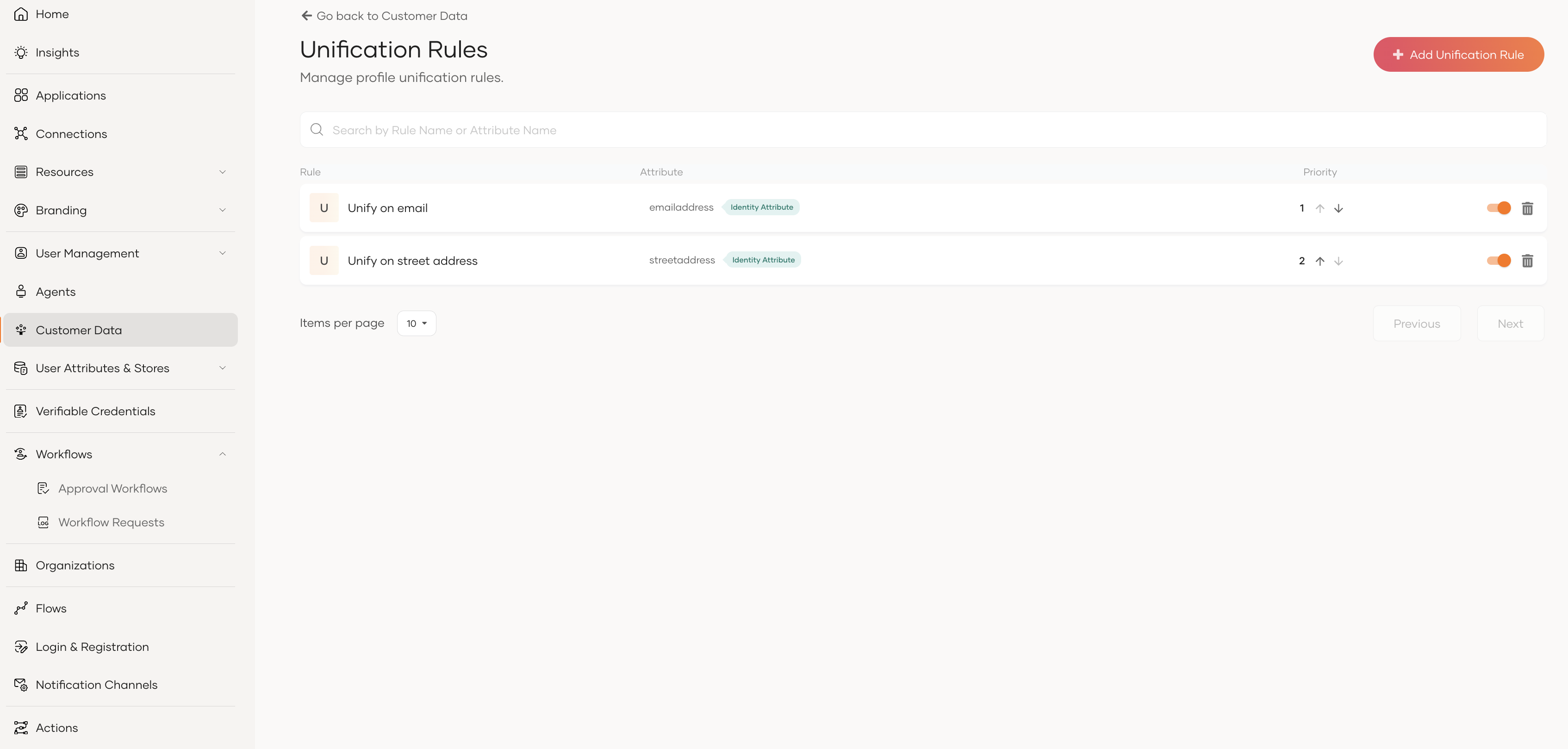
View unification rules
- From the console, go to Customer Data and select Unification Rules.
- The list shows every rule defined for your organization, ordered by priority. The lowest priority number is evaluated first.
Create a rule
- Click Add Unification Rule.
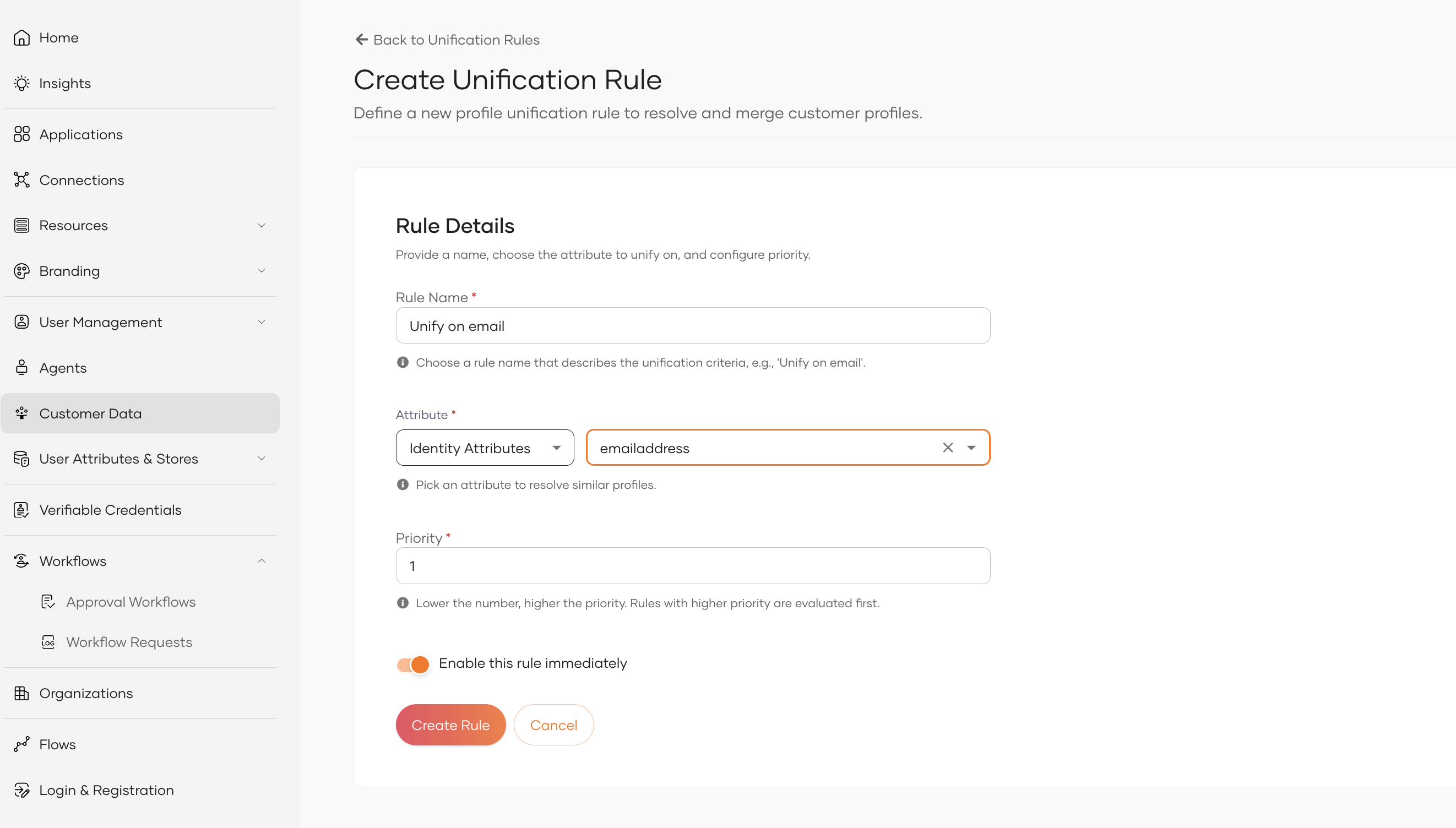
- Fill in:
- Rule name — human-readable name.
- Attribute — the profile attribute to match on. Select the scope (e.g.
Identity Attributes) and the attribute (e.g.emailaddress). - What this attribute holds — the kind of value the attribute carries, such as Email address or Name. This decides how values are compared and how much a match counts. See what the attribute holds.
- How it is matched — Exact matches only the same value. Dates, phone numbers and unique identifiers are put in a standard form first, so
ABC123andabc123match as unique identifiers; names, email addresses and locations must be identical character for character. Tolerant also matches typos and spelling variations, so it finds duplicates exact matching misses, and sends more matches for an administrator to confirm. - Priority — lower numbers are evaluated first.
- Enable this rule immediately — select this option to apply the rule when you create it.
- Click Create Rule.
curl -X POST 'https://localhost:8900/t/carbon.super/cds/api/v1/unification-rules' \
  -H 'Authorization: Bearer <access_token>' \
  -H 'Content-Type: application/json' \
  -d '{
    "rule_name": "Email",
    "property_name": "identity_attributes.emailaddress",
    "attribute_type": "EMAIL",
    "unification_method": "deterministic",
    "priority": 1,
    "is_active": true
  }'
| Field | Console |
|---|---|
rule_name |
Rule name. It cannot be changed later. |
property_name |
Attribute, written <scope>.<attribute>. |
attribute_type |
What this attribute holds: PRIMITIVE_EXACT, FUZZY_STRING, NAME, EMAIL, PHONE, LOCATION, DATE or UNIQUE_ID. |
unification_method |
How it is matched: deterministic for Exact, fuzzy for Tolerant. |
priority |
Priority. |
is_active |
Enable this rule immediately. |
The request needs the internal_cds_unification_rule_create scope.
Note
Tolerant is offered only for attribute kinds where it makes sense — names, email addresses, phone numbers, locations and other free text. Unique identifiers and dates are always compared exactly.
Note
In WSO2 Identity Server, Tolerant matching is available only when it is turned on for the Customer Data Directory deployment. It is off by default. While it is off, tolerant rules cannot be created and existing ones are evaluated as Exact. See Configure tolerant matching.
Reorder a rule
Use the up and down arrows in the Priority column to change the order in which rules are evaluated.
Reordering a rule does not retroactively merge or un-merge existing profiles — it only affects future unification runs.
Disable a rule
Turn off the toggle of the rule in the list and confirm. The rule is skipped during evaluation but stays in the list and keeps its priority.
curl -X PATCH 'https://localhost:8900/t/carbon.super/cds/api/v1/unification-rules/<rule_id>' \
  -H 'Authorization: Bearer <access_token>' \
  -H 'Content-Type: application/json' \
  -d '{ "is_active": false }'
The rule is skipped during evaluation but stays in the list and keeps its priority. Send true to turn it on again. The request needs the internal_cds_unification_rule_update scope.
Delete a rule
Existing merges already recorded under this rule are not reversed.
Related
- Unification rules — concepts and field reference.
- Configure matching confidence — how high a match has to score before profiles are unified.
- Review profile matches — decide on pairs the service held back.
- Profile attributes — the attribute set rules can match on.