Web Analytics Solutions
Web Analytics are used to analyze web traffic and user interactions on a website. WSO2 Identity Server supports integrating Google Analytics and Mixpanel as analytics solutions and allows you to enable either one or both of them.
You can set up web analytics in one of the following ways:
- Using a custom layout - Add the analytics scripts to a custom layout from the Console. This doesn't need any changes to the server files.
- Using JSP extensions - Add the analytics extensions to the JSP files of the authentication and account recovery portals.
Set up web analytics using a custom layout
You can add Google Analytics and Mixpanel to the login and account recovery pages by adding their scripts to a custom layout in the Console.
How it works
The scripts in this section work as follows:
- The login and account recovery pages call a
trackEvent()function when users visit pages, click buttons or run into errors. By default, this function does nothing. The script in the HTML tab replaces it, so these events are sent to Google Analytics and Mixpanel. - Error pages call
trackEvent()before the layout loads. The script in the HTML tab runs these calls again, so the error details aren't lost. - The script in the JS tab sends one
wso2_*event for each page when the user submits a form or leaves the page. It also sends awso2_login_failureevent when a login attempt fails. - Both tools receive each event with the same name and properties. Each event also includes a
portal_pageproperty, which holds thedata-pagevalue of the page.
Prerequisites
Get the details of the analytics tools you want to use:
- Google Analytics - Create a Google Analytics 4 property and copy its measurement ID from Admin > Data streams > Web. The ID looks like
G-XXXXXXXXXX. - Mixpanel - Create a Mixpanel project and copy its token from Project settings > Overview. Note the data residency region of the project (US, EU or India).
Add analytics to a custom layout
-
On the WSO2 Identity Server Console, go to Branding > Styles & Text.
-
Select Organization or Application from the top-right corner to choose where the layout applies.
-
Go to the Design tab, select the Custom layout and click Create. The HTML, CSS and JavaScript editor opens with the default layout.
-
In the HTML tab, add the following script at the top, above
{{{MainSection}}}.HTML tab script
<!-- Web analytics (Google Analytics and Mixpanel). Keep this script above MainSection. -->
<script>
    (function () {
        /* ---------- Configuration ---------- */
        /* Google Analytics 4 measurement ID. Set to "" to disable Google Analytics. */
        var GA_MEASUREMENT_ID = "G-XXXXXXXXXX";
        /* Mixpanel project token. Set to "" to disable Mixpanel. */
        var MIXPANEL_TOKEN = "YOUR_MIXPANEL_PROJECT_TOKEN";
        /* Mixpanel region: US "https://api-js.mixpanel.com", EU "https://api-eu.mixpanel.com", India "https://api-in.mixpanel.com". */
        var MIXPANEL_API_HOST = "https://api-js.mixpanel.com";
        /* ----------------------------------- */

        var page = document.body.getAttribute("data-page") || "";
        var providers = [];

        /* Event and property names: letters, digits and underscores only, up to 40 characters. */
        function toName(name) {
            return String(name).replace(/[^A-Za-z0-9_]/g, "_").substring(0, 40);
        }
        function toProps(props) {
            var out = {};
            for (var k in (props || {})) {
                if (Object.prototype.hasOwnProperty.call(props, k)) { out[toName(k)] = props[k]; }
            }
            return out;
        }

        /* ---------- Google Analytics 4 ---------- */
        if (GA_MEASUREMENT_ID) {
            window.dataLayer = window.dataLayer || [];
            window.gtag = function () { window.dataLayer.push(arguments); };
            window.gtag("js", new Date());
            window.gtag("config", GA_MEASUREMENT_ID, { page_title: page || document.title });

            var gaTag = document.createElement("script");
            gaTag.async = true;
            gaTag.src = "https://www.googletagmanager.com/gtag/js?id=" + GA_MEASUREMENT_ID;
            document.head.appendChild(gaTag);

            providers.push(function (name, props) {
                window.gtag("event", name, props);
            });
        }

        /* ---------- Mixpanel ---------- */
        if (MIXPANEL_TOKEN) {
            /* Mixpanel loader snippet, kept on one line. */
            (function (f, b) { if (!b.__SV) { var e, g, i, h; window.mixpanel = b; b._i = []; b.init = function (e, f, c) { function g(a, d) { var b = d.split("."); 2 == b.length && ((a = a[b[0]]), (d = b[1])); a[d] = function () { a.push([d].concat(Array.prototype.slice.call(arguments, 0))); }; } var a = b; "undefined" !== typeof c ? (a = b[c] = []) : (c = "mixpanel"); a.people = a.people || []; a.toString = function (a) { var d = "mixpanel"; "mixpanel" !== c && (d += "." + c); a || (d += " (stub)"); return d; }; a.people.toString = function () { return a.toString(1) + ".people (stub)"; }; i = "disable time_event track track_pageview track_links track_forms track_with_groups add_group set_group remove_group register register_once alias unregister identify name_tag set_config reset opt_in_tracking opt_out_tracking has_opted_in_tracking has_opted_out_tracking clear_opt_in_out_tracking start_batch_senders people.set people.set_once people.unset people.increment people.append people.union people.track_charge people.clear_charges people.delete_user people.remove".split(" "); for (h = 0; h < i.length; h++) { g(a, i[h]); } var j = "set set_once union unset remove delete".split(" "); a.get_group = function () { function b(c) { d[c] = function () { var call2 = [c].concat(Array.prototype.slice.call(arguments, 0)); a.push([e, call2]); }; } for (var d = {}, e = ["get_group"].concat(Array.prototype.slice.call(arguments, 0)), c = 0; c < j.length; c++) { b(j[c]); } return d; }; b._i.push([e, f, c]); }; b.__SV = 1.2; e = f.createElement("script"); e.type = "text/javascript"; e.async = !0; e.src = "https://cdn.mxpnl.com/libs/mixpanel-2-latest.min.js"; g = f.getElementsByTagName("script")[0]; g.parentNode.insertBefore(e, g); } })(document, window.mixpanel || []);

            /* The page view is sent manually so that it carries the current portal_page. */
            window.mixpanel.init(MIXPANEL_TOKEN, {
                api_host: MIXPANEL_API_HOST,
                track_pageview: false,
                persistence: "localStorage"
            });
            window.mixpanel.track_pageview({ portal_page: page });

            /* Events sent while the page unloads use sendBeacon so they aren't lost. */
            providers.push(function (name, props, options) {
                if (options && options.beacon) {
                    window.mixpanel.track(name, props, { transport: "sendBeacon", send_immediately: true });
                } else {
                    window.mixpanel.track(name, props);
                }
            });
        }

        /* Sends an event to every enabled tool. The JS tab script uses this too. */
        window.__analytics = {
            toName: toName,
            track: function (eventName, props, options) {
                var name = toName(eventName);
                var cleanProps = toProps(props);
                if (!("portal_page" in cleanProps)) { cleanProps.portal_page = page; }
                for (var p = 0; p < providers.length; p++) {
                    try { providers[p](name, cleanProps, options); } catch (e) { /* never break the page */ }
                }
            }
        };

        /* Forward the events that the login and account recovery pages send. */
        window.trackEvent = function (eventName, metadata) {
            window.__analytics.track(eventName, metadata);
        };

        /* Replay the trackEvent() calls that error pages made before this script loaded. */
        var onlyTrackEvent = new RegExp("^trackEvent\\(\"[\\w-]+\",\\s*\\{[\\s\\S]*\\}\\);?$");
        var parsed = document.getElementsByTagName("script");
        for (var s = 0; s < parsed.length; s++) {
            var code = (parsed[s].text || "").trim();
            if (parsed[s] !== document.currentScript && onlyTrackEvent.test(code)) {
                try { new Function(code)(); } catch (e) { /* ignore */ }
            }
        }
    })();
</script>
Warning
- The layout editor removes line breaks from the HTML tab. In this script, use only
/* */comments and end every statement with a semicolon. A//comment turns the rest of the script into a comment. - Keep the script above
{{{MainSection}}}. Otherwise, the events that pages send while they load are lost.
- The layout editor removes line breaks from the HTML tab. In this script, use only
-
In the script, set the following values. To use only one of the tools, set the value of the other tool to
"".Variable Value GA_MEASUREMENT_IDThe measurement ID of your Google Analytics property. MIXPANEL_TOKENThe token of your Mixpanel project. MIXPANEL_API_HOSTThe API host for the region of your Mixpanel project.
US:https://api-js.mixpanel.com
EU:https://api-eu.mixpanel.com
India:https://api-in.mixpanel.com -
Leave the CSS tab as it is.
-
In the JS tab, add the following script after the existing content.
JS tab script
// Web analytics (Google Analytics and Mixpanel). // Requires the analytics script in the HTML tab. (function () { // Do nothing if the HTML tab script is missing. if (!window.__analytics) { return; } var page = document.body.getAttribute("data-page") || ""; var url = window.location.href; var params = new URLSearchParams(window.location.search); // Maps data-page values to event names. var PAGE_EVENTS = { "sign-in": "wso2_login", "self-registration-username-request": "wso2_sign_up_username", "self-registration-with-verification": "wso2_sign_up_details", "self-registration-without-verification": "wso2_sign_up_details", "self-registration-with-verification-notify": "wso2_sign_up_request_complete", "self-registration-complete": "wso2_sign_up_process_complete", "username-recovery": "wso2_username_recovery", "username-recovery-complete": "wso2_username_recovery_complete", "password-recovery": "wso2_password_recovery", "password-recovery-with-claims": "wso2_password_recovery", "password-recovery-with-claims-notify": "wso2_recovery_request_complete", "password-reset": "wso2_password_recovery_reset", "password-reset-complete": "wso2_password_recovery_complete", "password-reset-success": "wso2_password_recovery_complete", "privacy-policy": "wso2_privacy_policy", "cookie-policy": "wso2_cookie_policy", "retry": "wso2_error", "error": "wso2_error" }; // Finds the event name from the URL when the data-page value isn't mapped. function eventFromUrl() { if (params.get("isUsernameRecovery") === "true") return "wso2_username_recovery"; if (params.get("isUsernameRecovery") === "false") return "wso2_password_recovery"; if (url.indexOf("accountrecoveryendpoint/register.do") > -1) return "wso2_sign_up_username"; if (url.indexOf("accountrecoveryendpoint/signup.do") > -1) return "wso2_sign_up_details"; if (url.indexOf("accountrecoveryendpoint/processregistration.do") > -1) return "wso2_sign_up_request_complete"; if (url.indexOf("accountrecoveryendpoint/confirmregistration.do") > -1) return "wso2_sign_up_process_complete"; if (url.indexOf("accountrecoveryendpoint/verify.do") > -1) return "wso2_recovery_request_complete"; if (url.indexOf("accountrecoveryendpoint/confirmrecovery.do") > -1) return "wso2_password_recovery_reset"; if (url.indexOf("accountrecoveryendpoint/completepasswordreset.do") > -1) return "wso2_password_recovery_complete"; if (url.indexOf("retry.do") > -1) return "wso2_error"; return null; } var eventName = PAGE_EVENTS[page] || eventFromUrl() || ("wso2_page_" + window.__analytics.toName(page || "generic")).substring(0, 40); var common = { portal_page: page, response_type: document.body.getAttribute("data-response-type") || "" }; // A failed login returns to the sign-in page with authFailure=true. if (page === "sign-in" && params.get("authFailure") === "true") { window.__analytics.track("wso2_login_failure", Object.assign({ error_code: params.get("errorCode") || "" }, common)); } var pageVisitTime = Date.now(); var fired = false; // Sends the page event once, when the user submits a form or leaves the page. function fire(eventType) { if (fired) return; fired = true; window.__analytics.track(eventName, Object.assign({ event_type: eventType, time_on_page_sec: Math.round((Date.now() - pageVisitTime) / 1000) }, common), { beacon: true }); } document.addEventListener("submit", function () { fire("submitted"); }, true); window.addEventListener("pagehide", function () { fire("left"); }); })(); -
Click Save & Publish.
When users visit the login and account recovery pages, WSO2 Identity Server sends the analytics events to the tools you configured.
Events captured using a custom layout
The following events are sent with the same names to both Google Analytics and Mixpanel.
| Event type | Events |
|---|---|
| Page views | Google Analytics page_view and Mixpanel $mp_web_page_view, sent for every login and account recovery page. |
| Page visits | page_visit_authentication_portal, page_visit_authentication_portal_identifierauth and page_visit_authentication_portal_fido2. |
| Button clicks | Clicks on the sign-in, identifier continue, sign in with a connection, sign-up, TOTP, SMS OTP, email OTP and backup code continue buttons, and the FIDO2 retry button. |
| Errors | authentication_portal_error for HTTP errors from 400 to 504, and authentication_portal_error_oauth2, authentication_portal_error_generic, authentication_portal_error_totp and authentication_portal_error_backup_code for authentication errors. |
| Login failures | wso2_login_failure, with the error_code property. |
| Login, sign-up and recovery pages | wso2_login, wso2_sign_up_username, wso2_sign_up_details, wso2_sign_up_request_complete, wso2_sign_up_process_complete, wso2_username_recovery, wso2_username_recovery_complete, wso2_password_recovery, wso2_recovery_request_complete, wso2_password_recovery_reset, wso2_password_recovery_complete, wso2_privacy_policy, wso2_cookie_policy and wso2_error. Other pages send wso2_page_<data-page>. |
The wso2_* page events include the following properties.
| Property | Description |
|---|---|
portal_page |
The data-page value of the page. |
response_type |
The data-response-type value of the page, such as error or success. |
event_type |
submitted if the user submitted a form, or left if the user left the page. |
time_on_page_sec |
The number of seconds the user spent on the page. |
Things to consider
- Pages covered - The scripts cover only the login and account recovery pages. The My Account and Console applications aren't covered.
- Layout - Selecting the Custom layout replaces the built-in layouts for the organization or application.
- Scope - Each organization or application uses its own layout. Add the scripts to the layout of each one you want to track.
- Product updates - The scripts depend on how the login and account recovery pages send events. Test your analytics after WSO2 Identity Server updates.
- User consent - Google Analytics sets cookies, and Mixpanel stores an anonymous ID in the browser's local storage. If your users must consent to tracking, use Google Analytics consent mode and Mixpanel's
mixpanel.opt_out_tracking()method. - Personal data - The scripts don't identify users. Users remain anonymous, and no personal data is sent to the analytics tools.
Set up web analytics using JSP extensions
Follow the steps below to configure a web analytics solution for WSO2 Identity Server.
-
Create an analytics project and obtain the relevant token.
-
For Google analytics:
-
Follow the Google analytics documentation and create an analytics project.
-
Navigate to Admin > Tracking Info > Tracking Code, and look for the token of your project in
gtag('config', '<TOKEN>');.
-
-
For Mixpanel:
-
Follow the Mixpanel documentation and create an analytics project.
-
Navigate to Settings > Set up Mixpanel, and look for the token of your project in
mixpanel.init("<TOKEN>");.
-
-
-
Download the samples-is repository and extract its content.
-
In the samples-is root directory, go to
analytics-extensionsand open theconfig.jspfile. Add the token/s obtained in step 1 above to the relevant line of the file. -
Copy the
analytics.jspandconfig.jspfiles found inanalytics-extensionsand paste them in both<IS_HOME>/authenticationendpoint/includeand<IS_HOME>/accountrecoveryendpoint/includedirectories. -
Find the
header.jspfile located in both<IS_HOME>/authenticationendpoint/includeand<IS_HOME>/accountrecoveryendpoint/includedirectories and add the following line to the end of the files. -
Run WSO2 Identity Server instance and the analytics events will be fired when users access the relevant web pages.
Types of analytic events
The following are the events that are captured when analytics are enabled in WSO2 Identity Server.
| Event name | Description |
|---|---|
wso2_generic_event |
A generic event that will be fired unless the event belongs to one of the types below. |
wso2_error |
An error has occurred. |
wso2_login |
The login page has been visited. |
wso2_login_failure |
Login has failed. |
wso2_sign_up_username |
Self sign up username page has been visited. |
wso2_sign_up_details |
Self sign up user detail collection page has been visited. |
wso2_sign_up_request_complete |
A request for a self sign up has been completed. |
wso2_sign_up_process_complete |
A sign up flow has been completed including the confirmation. |
wso2_username_recovery |
Username recovery page has been visited. |
wso2_password_recovery |
Password recovery page has been visited. |
wso2_recovery_request_complete |
Request for a username/password recovery is complete. |
wso2_password_recovery_reset |
Password reset page has been visited. |
wso2_password_recovery_complete |
A password recovery flow has been successfully completed. |
wso2_privacy_policy |
Privacy policy page has been visited. |
wso2_cookie_policy |
Cookie policy page has been visited. |
View analytics
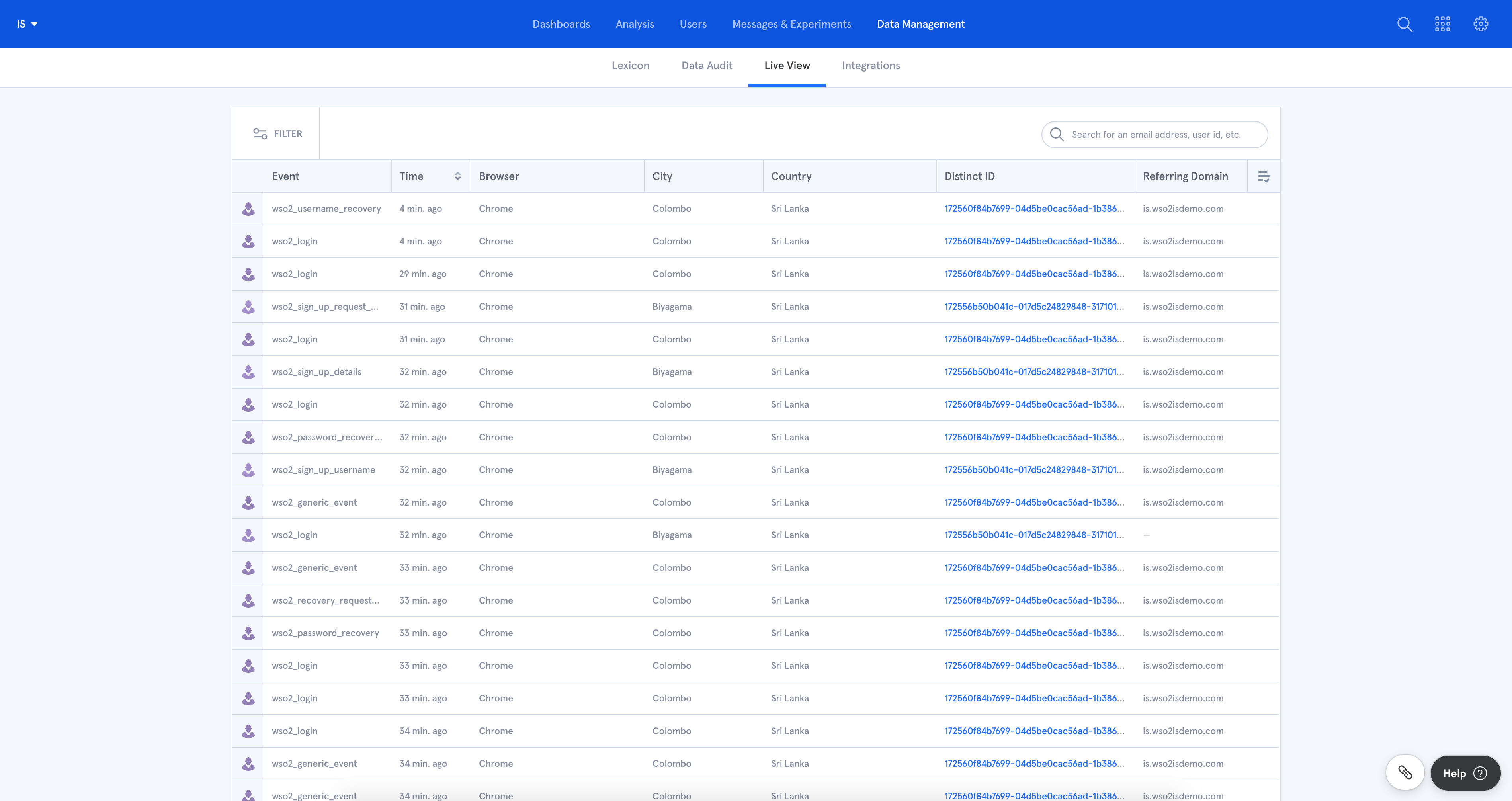
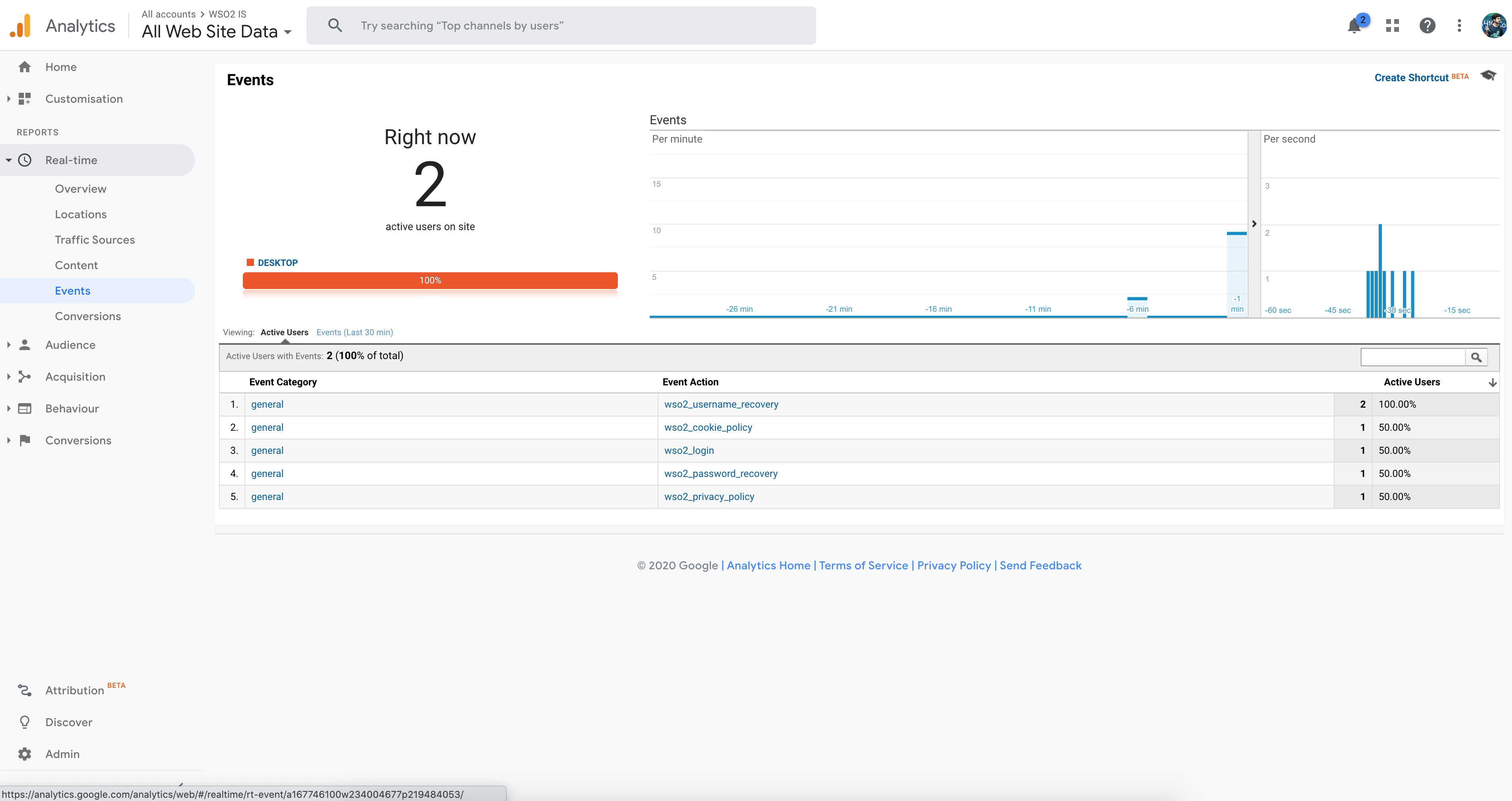
You can view the analytics events from the dashboards of Google Analytics and Mixpanel. The following are sample views.
Google Analytics
Mixpanel