Financial-grade API 2.0
Financial-grade API (FAPI), a specification that extends the OAuth and OIDC frameworks, was introduced by the FAPI Working Group and defines additional technical requirements to secure high-value APIs.
FAPI 2.0 builds upon FAPI 1.0 Advanced and introduces additional security measures to further enhance the protection of sensitive data and transactions. WSO2 Identity Server facilitates the creation of FAPI 2.0-compliant applications from the Console and with Dynamic Client Registration (DCR).
Note
Learn how to create a FAPI-compliant application in WSO2 Identity Server.
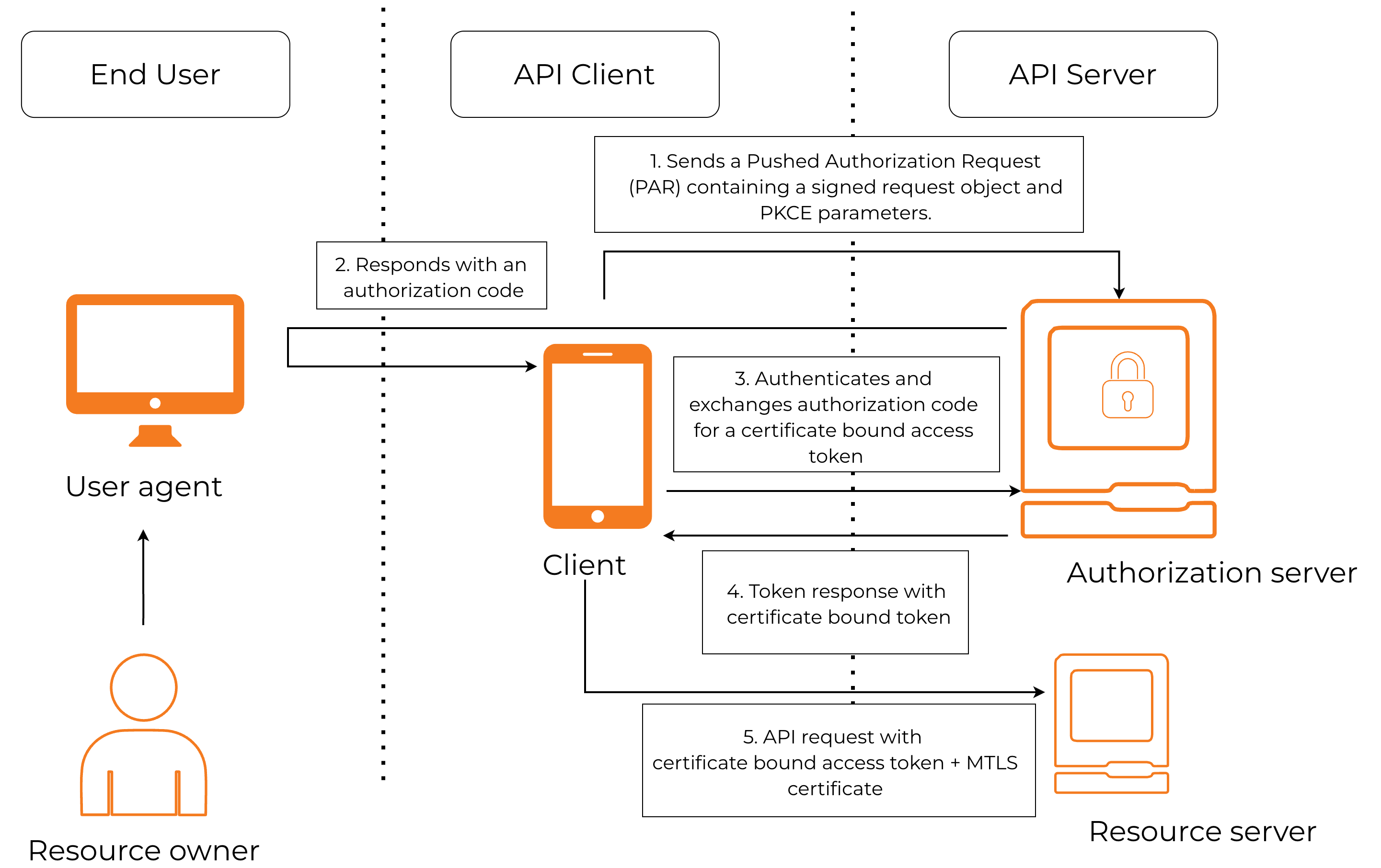
The following diagram illustrates how FAPI-compliant features combine to secure applications and the following topics explain the illustrated concepts.
Authorization code grant type
FAPI 2.0 mandates the use of the authorization code grant type for all FAPI-compliant applications. The implicit and hybrid grant types are not allowed in FAPI 2.0. Follow the steps below to apply this restriction.
-
On the WSO2 Identity Server Console, go to Applications.
-
Select the created FAPI-compliant application and go to its Protocol tab.
-
Under Allowed grant types, select only the code grant type.
-
Under Authorized redirect URLs, add the redirect URLs allowed for the application.
-
Under Allowed origins, add the allowed origins for the application.
-
Click Update to save the changes.
Proof Key for Code Exchange (PKCE)
To be FAPI 2.0-compliant, clients must use Proof Key for Code Exchange (PKCE) when making authorization requests. With PKCE, the client generates a code verifier and derives a code challenge from it. The client must use the S256 code challenge method to create the code challenge.
Follow the steps below to enforce PKCE:
-
On the WSO2 Identity Server Console, go to Applications.
-
Select the created FAPI-compliant application and go to its Protocol tab.
-
Under PKCE, select Mandatory.
Note
FAPI 2.0 disallows the use of the
Plaincode challenge method. Therefore, when PKCE is made mandatory, WSO2 Identity Server automatically restricts the code challenge method toS256only. -
Click Update to save the changes.
Client authentication
FAPI 2.0 requires clients to authenticate using one of the following methods:
-
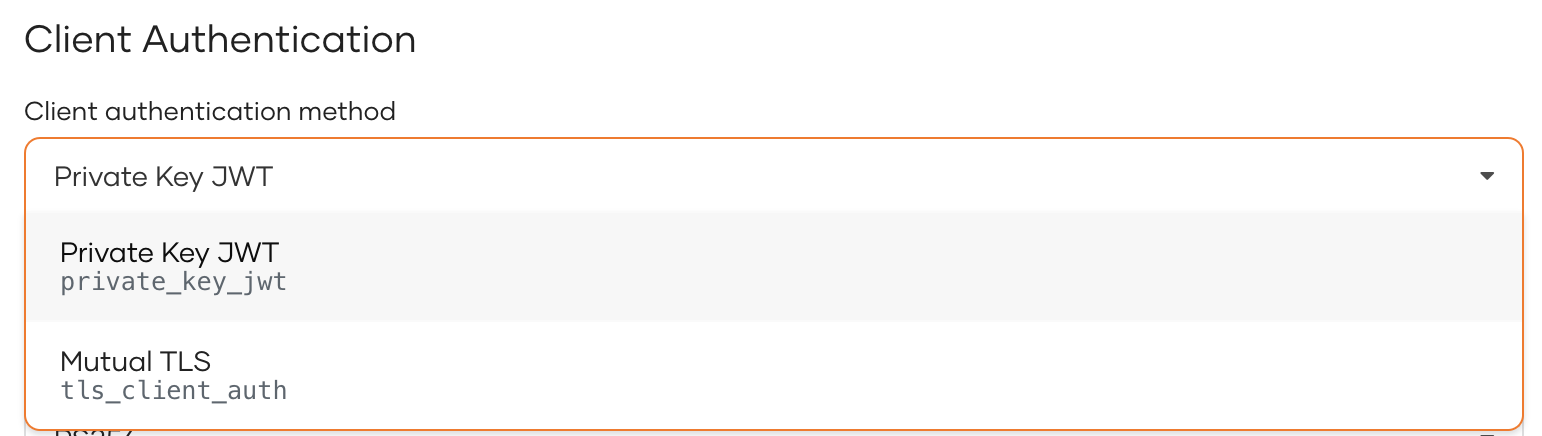
Private Key JWT - The client sends a client-generated JSON Web Token (JWT) signed with the private key in its authentication request. The authorization server will verify the signature with the client's public key.
Info
Learn more about private key JWT in Implement private key JWT client authentication for OIDC.
-
Mutual TLS - The server presents its certificate to the client to verify its identity and the client sends its certificate to the server to establish a two-way trust relationship.
WSO2 Identity Server will use the selected client authentication method to verify the identity of the client making requests to it.
Follow the steps below to configure a FAPI-compliant client authentication method.
-
On the WSO2 Identity Server Console, go to Applications.
-
Select the created FAPI-compliant application and go to its Protocol tab.
-
Under Client Authentication, select one of the following Client authentication methods.
-
Click Update to save the changes.
Pushed Authorization Requests (PAR)
Using Pushed Authorization Requests (PAR), clients can push the authorization request parameters to the authorization server from a back-channel request before making the authorization request. FAPI 2.0 requires authorization requests to be made using PAR.
Follow the steps below to implement FAPI-compliant PAR requests for the code grant type.
-
On the WSO2 Identity Server Console, go to Applications.
-
Select the created FAPI-compliant application and go to its Protocol tab.
-
Under Pushed Authorization Requests, select Mandatory.
-
Click Update to save the changes.
Request object handling
FAPI 2.0 requires the JWT containing the authorization request parameters sent to the Pushed Authorization Request (PAR) endpoint to be signed and optionally encrypted.
Follow the steps below to configure a FAPI-compliant request object:
-
On the WSO2 Identity Server Console, go to Applications.
-
Select the created FAPI-compliant application and go to its Protocol tab.
-
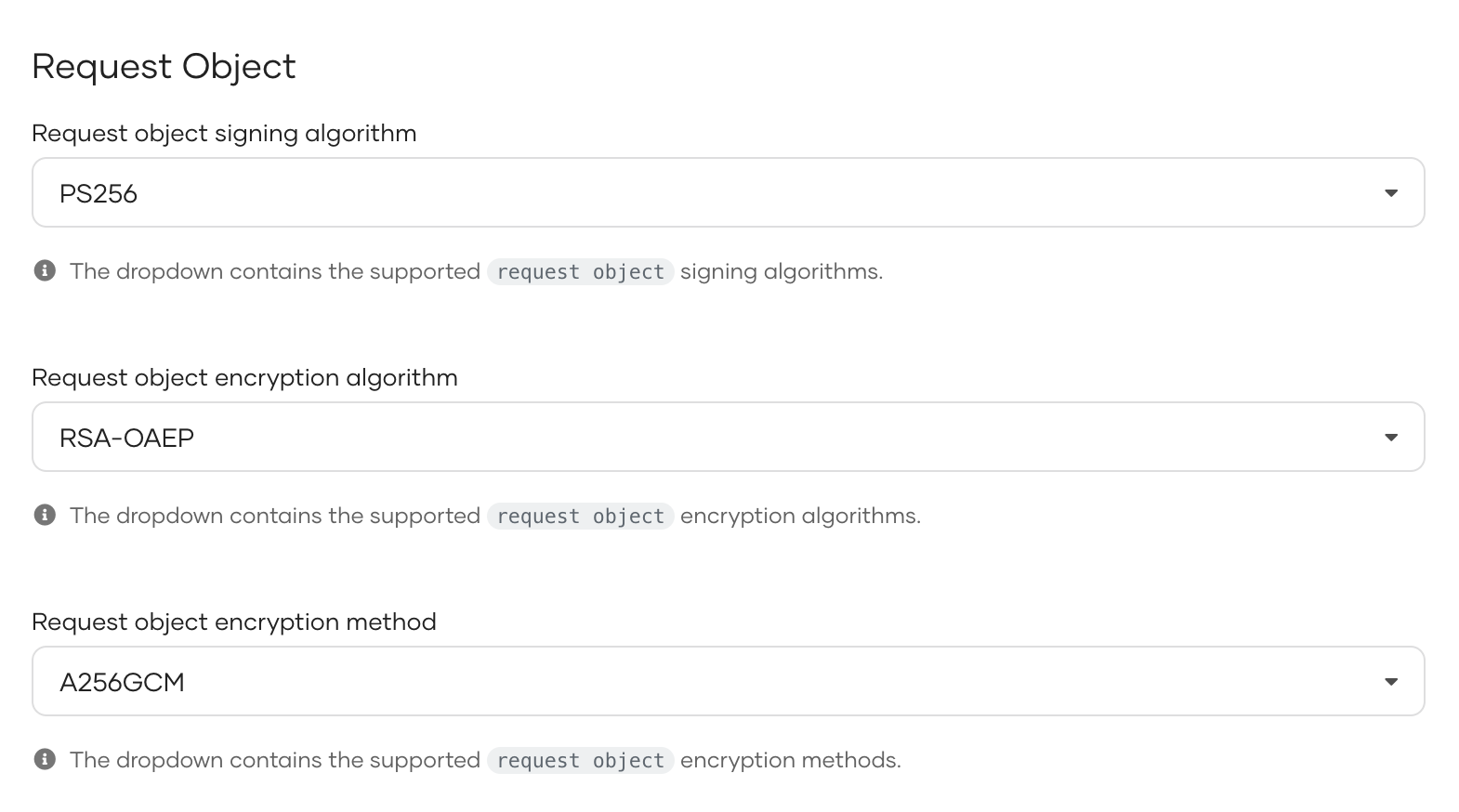
Select a FAPI-compliant signing algorithm under Request object signing algorithm.
-
Optionally, you can encrypt the request object, by choosing,
- a FAPI-compliant asymmetric key encryption algorithm under Request object encryption algorithm
- a FAPI-compliant symmetric key encryption method under Request object encryption method.
-
Click Update to save the changes.
Certificate-bound access tokens
Access token binding prevents token theft and misuse by tying the token to a client-specific credential or element. FAPI 2.0 mandates the use of certificate-bound access tokens which binds the token to the hash of the TLS certificate passed on the token request.
WSO2 Identity Server automatically binds access tokens to the client's TLS certificate in a FAPI-compliant application.
Note
Refer to OIDC Configurations to learn about the token binding methods supported in WSO2 Identity Server.